

Ekahau site survey cost is mostly engineer time, not software. The tools are the supplier’s overhead, already carried in the day rate. What changes the figure on your quote is the work itself: how much area gets walked, which survey methods are used, how many AP-on-a-stick positions are tested, and how much analysis goes into the report.
So the useful question isn’t what Ekahau costs. It’s what an Ekahau-based survey involves, and which parts of it you actually need. That’s what this post covers. If you’re still deciding between Ekahau and AirMagnet, our Ekahau vs AirMagnet comparison deals with that separately.
The Ekahau toolkit: hardware, software and project files
An Ekahau survey is built around three pieces. The first is the survey hardware: Ekahau’s Sidekick measurement device, which the engineer carries on a strap or attaches to a tablet. It contains dedicated Wi-Fi radios and a spectrum analyser, so it scans every channel quickly and consistently, rather than relying on whatever adapter happens to be in the laptop. Consistent hardware matters because it means readings taken on one visit compare cleanly with readings taken on the next.
The second is the design and analysis software, which runs on a laptop. This is where floor plans are imported and scaled, walls are drawn and assigned materials, predictive designs are built, and survey data is turned into heatmaps. The third is the project file itself, which holds the plans, the design, every reading and the access point list. It’s the real deliverable for a network team, because it can be reopened, re-analysed and updated later.
Ekahau also offers mobile survey apps and cloud project sharing. Whether those are used depends on the job and the supplier’s setup, so ask rather than assume.
The desk work you pay for before and after the visit
A good part of an Ekahau survey happens away from site, and it’s easy to forget when you look at a quote. Before the visit, the engineer imports each floor plan, sets the scale and builds a requirements profile in the software: the minimum signal, signal-to-noise and secondary coverage your client devices need, for each band. For a predictive design they also draw every wall and assign it a material, mark spaces such as lift shafts and atriums, and place access points using the model and antenna pattern you plan to deploy.
After the visit comes the analysis. The survey data is cleaned up (removing stray readings and checking the walked path lines up with the walls), access points are matched to the names in the controller export, and each map is checked against the requirements profile. Then the report is written. On a multi-floor job with several bands, this stage can take as long as the walking did. That’s why two quotes with the same number of site days can still differ: one has priced the analysis properly and the other may not have.
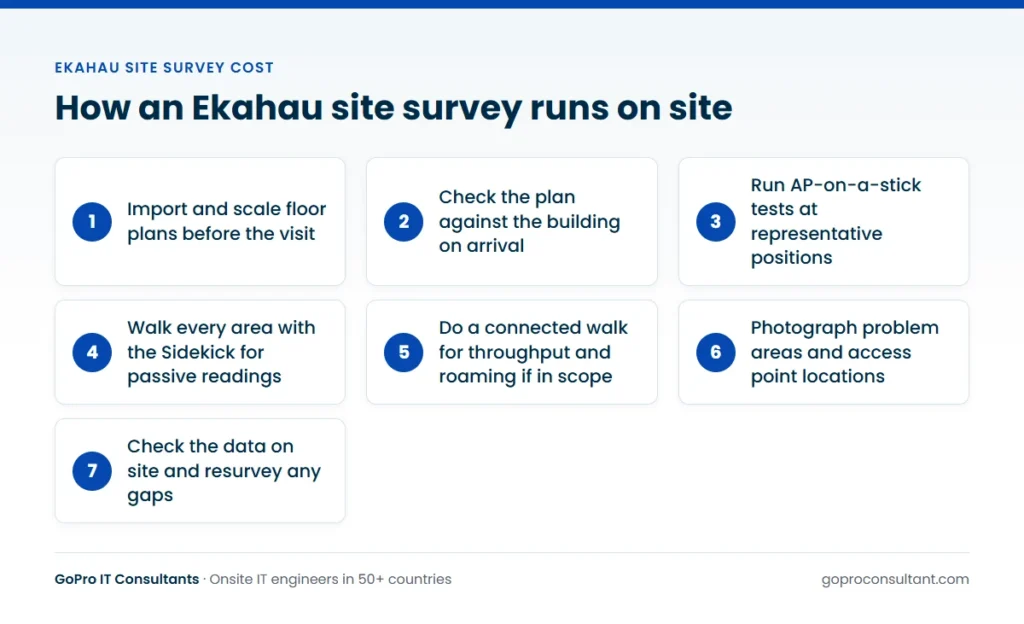
How an Ekahau survey runs on site
The onsite part follows a fairly fixed sequence, whichever survey types are in scope:
- Floor plans are imported and scaled in the software before the visit
- On arrival, the engineer checks the plan against the real building and notes changes
- For predictive designs, AP-on-a-stick tests are run at representative positions
- The engineer walks every area with the Sidekick, capturing passive readings
- If active testing is in scope, a connected walk measures throughput and roaming
- Photos are taken of problem areas and proposed or existing access point locations
- Data is checked before leaving, so gaps can be resurveyed the same day
That last step is worth insisting on. Finding a missing corridor in the data back at the office means another trip.
Calibration is the other quiet time cost. The engineer has to set the scale on every floor plan and keep their position on the map accurate while walking, tapping in their location as they go. On a clean CAD drawing that’s quick. On a photographed fire escape plan with no scale bar, it can take a while, and errors there show up as heatmaps that don’t line up with the walls. Good plans are the cheapest way to get a better survey.
What drives Ekahau site survey cost
The same factors apply as for any survey, and our guide to wireless site survey cost covers them in more depth. For an Ekahau job specifically, these are the ones that move the price most:
| Factor | Why it changes the time |
|---|---|
| Floor area and layout | Every space clients use has to be walked at a steady pace |
| Number of floors and buildings | Each floor needs its own plan, calibration and walk |
| Survey type | Predictive is desk time; passive and active add site and analysis time |
| AP-on-a-stick positions | Each one means mounting, measuring, packing down and moving |
| Bands in scope | Reporting on 2.4, 5 and 6 GHz separately adds analysis |
| Reporting depth | Heatmaps only, or a full design pack with drawings and photos |
| Travel and access windows | Distance, overnight stays, out-of-hours work, escorts and inductions |
Two points are particular to Ekahau work. First, the survey hardware is quick, so the walk itself is rarely the bottleneck on a straightforward site. Layout, access and APoS testing usually are. Second, because the project file is so reusable, some partners buy a thorough first survey and lighter follow-up visits, which cuts the cost of later checks.
Also check whether the quote includes a post-install validation survey. If the survey is part of a new deployment, a second walk after the access points are mounted and configured is how you prove the design was delivered. Pricing it in from the start is usually simpler than raising a new ticket later.

Heatmaps and the report you get
The heatmaps are what most people picture when they think of Ekahau, and the software can produce a lot of them. The common views are:
- Signal strength (primary and secondary coverage, which matters for roaming)
- Signal-to-noise ratio
- Channel overlap and co-channel interference
- Data rate and throughput, from active surveys
- Spectrum and non-Wi-Fi interference, from the spectrum analyser
- Coverage against your design requirements, showing pass and fail areas
A good report doesn’t just paste every map in. It sets your requirements at the start (for example a minimum signal level and signal-to-noise ratio for voice), shows where the site passes and fails against them, and explains what to do about each failure: move an access point, add one, change a channel plan, adjust power, or deal with a source of interference.
Report depth is one of the easiest places to save or overspend. A network team that will design from the project file may only need a short findings note. An end client who has to sign off a design may need a full pack with an executive summary. Decide which you need before asking for a quote, and say whether it should go out on your template. On white-label work, it can.
How to check an Ekahau survey was done properly
You don’t need to be an Ekahau user to sanity check the result. Look for these in the report or the project file:
- The survey path is shown on each floor and covers every area in scope, including corridors and stairwells
- Heatmaps line up with the walls, which tells you the plans were scaled and calibrated properly
- The requirements profile is stated at the start, with the thresholds used for each band
- Your access points are named as they are in the controller, not listed as raw MAC addresses
- Areas that were out of scope or inaccessible on the day are marked as such, not left blank
- APoS positions are shown with photos and the mounting height used
- The report says when the survey ran and whether the site was occupied
If a heatmap shows signal passing through walls you know are solid, or large blank patches inside the building, ask about it before you sign off. A data gap is far easier to fix while the engineer is still booked on the project.
Licences, project files and who owns what
You shouldn’t see the Ekahau licence on your quote as a line item, and the supplier shouldn’t need you to own one. What you should agree is what you’ll receive. The usual options are a PDF report, the project file, or both. If your team wants the project file, check whether anyone on your side has the software to open and edit it. If not, a PDF and exported images may be more use, and you can request the file for the record anyway.
Agree too how the floor plans are handled. If they belong to the end client, say whether they can be retained after the job or should be deleted once the report is delivered. GoPro IT Consultants is ISO/IEC 27001:2022 certified, so this is a normal conversation to have at scoping, not an awkward one.
A typical case: one building, two very different wings
Say a client has a building with an older brick wing and a newer steel-frame extension, and wants a new Wi-Fi 6E network across both. Here’s how an Ekahau-based job would usually run.
The engineer starts with a predictive design from the plans for both wings. The brick walls in the old wing are thick and their real attenuation is a guess, so the model is treated as a starting point. On site, APoS tests go into the old wing first: a couple of typical rooms, the corridor junctions and the stairwell. The readings are used to correct the wall materials in the project file, and the access point plan is adjusted to match. The new wing behaves much closer to the model, so it needs fewer test positions.
Because the existing network is still live, a passive walk with the Sidekick on the same visit records what’s there now, plus any neighbouring networks, which feeds the channel plan for the new design. After the access point installation, the same project file is reopened and a validation survey is walked against the same requirements profile. The client ends up with one file holding the design, the test readings and the evidence that it was delivered.
Most of the cost in a job like this sits in the APoS work in the old wing and the analysis at 5 and 6 GHz. The walk itself is the quick part.
Who does what on an Ekahau survey
| Party | Responsible for |
|---|---|
| You (the IT provider) | Scope, requirements, access point model, client communication, sign-off |
| End client | Floor plans, site access, escorts, notice to staff |
| Network team (yours or the client’s) | Controller export, SSID access for active tests, support during the visit |
| Survey engineer | Plan preparation, APoS tests, the walk, onsite data checks, photos, site visit report |
| Vendor or distributor | Test access point and mounting kit, where agreed |
The two items that slip most often are floor plans and network access. Chase both before the engineer travels, because a survey without them either stalls or comes back thinner than you paid for.
Scoping an Ekahau survey for an accurate quote
The more complete the scope, the closer the quote will be to the final bill. Send scaled plans, the area in scope, the survey types, the number of APoS positions, the access point model, the bands to report on, client types, access hours and the report format. If there’s an existing network, include the controller or cloud dashboard export so the engineer can match readings to access point names.
Our Ekahau Wi-Fi site survey page covers how we run these jobs, and the broader wireless site survey service explains how they fit with design and remediation. If the survey leads to network changes, our managed network services can pick up the follow-on work, and our guide to the types of wireless site surveys helps you pick the right method before you ask.
How GoPro IT Consultants runs Ekahau surveys
Our engineers bring the survey toolset, so you don’t need your own licence or hardware. They’re briefed before each job, can work under your brand and report on your template, and never discuss commercial terms with the end client. You get a site visit report within 24 hours of every visit, and the full survey analysis on the date agreed at scoping. We price per ticket or by day rate, depending on the country and response tier. If the surveys span several countries, our global coverage page shows where engineers are available. The simplest way to start is one pilot ticket, with no minimum commitment.
Frequently asked questions
Do we need our own Ekahau licence to commission a survey?
No. The supplier provides the hardware and software. You only need the software yourself if your team wants to open and edit the project file rather than work from the PDF report.
Can we get the Ekahau project file as well as the report?
Usually yes, and it's worth agreeing at scoping. The project file holds the plans, readings and design, so it can be reopened later for re-analysis or a follow-up survey.
Can an Ekahau survey cover 6 GHz?
Yes, provided the survey hardware supports 6 GHz, which current Ekahau survey hardware does. Say in the scope which bands you want reported so analysis time is priced in.
How soon after the visit is the report delivered?
A site visit report with photos and work done follows within 24 hours. The full survey analysis and design report takes longer, depending on floors, bands and depth, so agree a date in the scope.
Need an Ekahau survey at a client site?
Send floor plans and scope for one pilot ticket. Our engineers can work under your brand and report on your template.
Scope a survey