

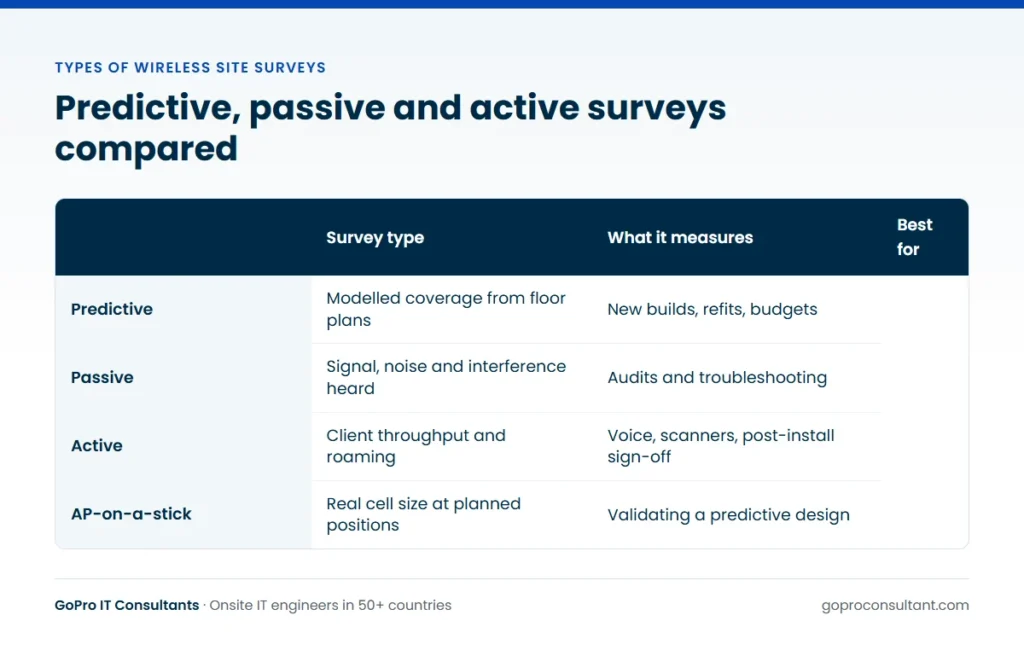
There are three main types of wireless site surveys: predictive, passive and active. A predictive survey designs the network in software before any hardware goes up. A passive survey walks the site and records what every access point in range is doing. An active survey connects to the network while walking and measures what a client actually gets. Most real projects use two of them, plus AP-on-a-stick testing to check the design against the building.
Picking the wrong one is an expensive mistake in both directions. If the problem is an existing network that drops voice calls, a predictive design gives you a nice drawing that tells you nothing about the fault. If the building hasn’t been fitted out yet, a full active survey measures a site that is about to change. Here’s how each one works and where it fits.
The three types of wireless site surveys at a glance
| Survey | What it tells you | When it fits |
|---|---|---|
| Predictive | Where access points should go, modelled from floor plans | New builds, refits, budgeting a project |
| Passive | Coverage, signal, noise and interference from every AP heard | Auditing an existing network, troubleshooting |
| Active | Real client throughput, retries and roaming on your SSID | Voice, scanners, sign-off after install |
The three aren’t competitors. They answer different questions, and the right choice depends on whether the network exists yet and what you need to prove.
Predictive surveys: design before anyone visits
A predictive survey is built at a desk. The engineer imports scaled floor plans into survey software such as Ekahau, draws in walls and assigns materials (plasterboard, brick, concrete, glass, metal), sets coverage and capacity requirements, then places access points until the model meets them. The output is a set of predicted heatmaps, an access point count and placement plan, and a bill of materials.
It’s quick, it needs no site access and it’s the only option for a building that doesn’t exist yet. Its weakness is that it’s only as good as the inputs. A plan that doesn’t show a lift core, a server room lined with racks or a mezzanine floor will produce a design that looks perfect and performs badly. Wall attenuation values are estimates, too, and real construction varies.
Predictive designs fit best when:
- The building is new, being refitted or the floor plan is changing
- You need an access point count and a budget before committing to hardware
- Site access is limited or the site is far away
- You plan to validate the design on site afterwards
Passive surveys: listening to what’s already there
In a passive survey the engineer walks every area with a survey adapter that listens on all channels without connecting to anything. The software records every access point it hears, its signal strength, the channel it’s on and the noise floor around it. With a spectrum analyser in the kit, it can also pick up non-Wi-Fi interference such as microwave ovens, wireless video senders or old cordless phone systems.
The result is a true picture of coverage and RF health: where signal drops below your design threshold, where too many access points share a channel, and how much neighbouring networks bleed in. That’s what you need for auditing an inherited network, investigating complaints, or checking a new installation against the design it was meant to deliver.
What a passive survey can’t tell you is how a client actually performs. Strong signal doesn’t guarantee good throughput if the channel is congested or the access point is overloaded.
Timing matters for passive work. Survey during normal working hours if you can, with the neighbouring offices or units occupied, because that’s when interference and channel contention are at their worst. A survey of an empty building on a Sunday can look healthier than the network your users actually live with on a Monday morning. If out-of-hours is the only option, note it in the report so whoever reads it knows the conditions.
Active surveys: testing what clients actually get
An active survey connects the survey adapter to your SSID and generates traffic while the engineer walks. It measures throughput, latency, packet loss, retries and, importantly, roaming: how and where the client moves from one access point to the next, and whether it drops the connection while doing it.
That makes it the right tool when performance matters more than coverage. Voice over Wi-Fi, handheld warehouse scanners, mobile point-of-sale and clinical devices all suffer if roaming is slow or a cell edge is in the wrong place. An active survey also tests the parts of the network a passive one ignores, such as authentication, DHCP and the path back to the core.
It takes longer and needs credentials and cooperation from whoever runs the network, so plan it with the network team rather than springing it on them. Many surveys run passive and active together on the same walk, using two adapters.
AP-on-a-stick: checking the design against the building
AP-on-a-stick (APoS) sits between predictive and onsite surveys. The engineer mounts a temporary access point on a tripod or mast at the planned height, powers it from a battery and measures the real cell around it. It’s a validation step rather than a survey type in its own right, but it’s the most reliable way to turn a predictive design into one you can trust.
It’s especially useful where construction is unknown or unusual: listed buildings with thick walls, hospitals with lead-lined rooms, warehouses with dense racking. The test access point should be the model you’ll deploy, or one with a matching antenna pattern, so the readings reflect what you’ll actually install.
Which survey fits which job
Most projects combine methods. A sensible default for a new office is a predictive design, a little APoS testing in representative and awkward areas, then a passive and active survey once the access points are installed and configured. For an existing network with complaints, start with passive and active and skip prediction until you know what’s wrong.
| Situation | Usual approach |
|---|---|
| New build or refit | Predictive, APoS validation, post-install active |
| Existing network, users complaining | Passive and active together |
| Moving to Wi-Fi 6E or Wi-Fi 7 | Passive audit, then predictive redesign for 6 GHz |
| Warehouse scanners or voice handsets | Predictive plus APoS, then active roaming tests |
| Many similar branch sites | Predictive per template site, passive spot checks |
If you’re weighing this against budget, our guide to what drives wireless site survey cost shows how each type affects engineer time.
A worked scenario: dropped calls now, a new floor next year
Say a client runs Wi-Fi calling on two occupied office floors. Calls drop as people walk from the open-plan area into the meeting rooms, and the client is also taking on a third floor that’s still a shell. That’s one project with two different questions, so it needs two different survey approaches.
- Start with the existing floors. Run passive and active together during a normal working day. The passive data shows coverage, channel use and interference, and the active walk follows a connected client along the routes people actually take, showing where roaming fails.
- Read the two together. If coverage is fine but roaming is slow, the fix is probably in configuration or the channel plan. If there’s a gap at the meeting room doors, it’s an access point position or a power setting.
- Make the fix, then re-walk the problem routes with a short active survey to confirm it worked. There’s no need to resurvey the whole floor.
- For the shell floor, build a predictive design from the fit-out drawings, using the same requirements as the voice floors.
- Once the partitions are up, run a short APoS check in the meeting room cluster and any rooms with unusual construction.
- After the access points are installed, finish with an active survey of the new floor, so the client has evidence that voice works before staff move in.
Notice what’s missing. Nobody builds a predictive model of the existing floors to diagnose the dropped calls, and nobody runs an active survey of an empty shell. Each method is used for the question it can answer.
Common mistakes when choosing a survey type
Using a predictive design to diagnose a fault
A model shows what the network should do, not what it’s doing. Complaints about an existing network need onsite data first. Prediction comes later, if the fix turns out to need new access point positions.
Stopping at passive when clients move
Passive data can show a clean coverage map while handsets still drop calls between cells. If devices move while they’re in use (voice handsets, scanners, mobile tills, clinical carts), add an active walk along the routes they take.
Designing for coverage and forgetting capacity
A training room, a staff canteen or a trading floor can have excellent signal and still struggle when everyone connects at once. Say how many clients you expect in the dense areas, so the predictive design places enough access points and the post-install survey tests the right spots.
Reusing an old design for 6 GHz
Moving to Wi-Fi 6E or Wi-Fi 7 changes how far signal carries through walls. A 5 GHz design laid over the same positions often leaves gaps at 6 GHz. Audit what’s there with a passive survey, then redesign for the new band.
Booking active testing without network access agreed
An active survey needs an SSID, credentials and sometimes a device registered on the network. Turning up without them wastes the visit. Agree access in advance with whoever runs the network, whether that’s your own team or the client’s managed network services provider.
What each survey type should deliver
Knowing what you should get back makes it easier to check the work. Each method has its own core outputs.
Predictive
Predicted coverage and signal-to-noise maps for each band against your stated requirements, the wall materials used in the model, an access point count with positions and mounting heights, and a bill of materials. Ask for the assumptions to be listed, so anyone reviewing the design can see what was estimated rather than measured.
Passive
Measured coverage, channel and co-channel interference maps, the list of access points heard (yours and the neighbours’), any non-Wi-Fi interference found, and the conditions at the time of the walk. The survey path should be shown on the plan, so you can see every area was covered.
Active
Throughput, retries and roaming events along the walked route, with the points where the client lost its connection or roamed late marked on the plan. It should state which SSID and which client device were used, because results vary between devices.
AP-on-a-stick
Measured cell edges at each test position, photos of the mast at the planned height, and a note of any position that should move. If the Wi-Fi work sits inside a bigger project, our site surveys page covers the wider range of pre-installation surveys. For Ekahau work, our guide to Ekahau site survey cost looks at the report and project file in more detail.
Briefing the engineer, whatever the survey type
The survey is only as useful as the brief behind it. Whichever method you choose, send the engineer:
- Scaled floor plans, with the survey area and any no-go zones marked
- The design requirements: minimum signal, signal-to-noise and the bands to cover
- Client types and density, including any voice or scanning devices
- The access point model, and the SSID and credentials for active testing
- Site contacts, access hours and any escort or induction rules
- The report format, and whether it goes out under your brand
The tool matters less than the method, but it shapes the deliverable. Our wireless site survey service covers all three survey types, using Ekahau or AirMagnet depending on what your team already works with, and the Ekahau vs AirMagnet comparison sets out the differences. Once the design is signed off, our access point installation guide picks up the next stage.
Glossary of wireless survey terms
These terms turn up in every survey report, whichever method was used:
- Signal strength (RSSI): the received signal level at the client, measured in dBm. Values closer to zero are stronger.
- Noise floor: the background RF energy on a channel, from other devices and the environment.
- SNR: signal-to-noise ratio, the gap between the signal and the noise floor. It says more about usable performance than signal strength alone.
- Primary and secondary coverage: the strongest and second-strongest access point heard at a point. Secondary coverage is what lets a client roam cleanly.
- Co-channel interference: access points on the same channel hearing each other and sharing airtime, which slows every client on them.
- Attenuation: signal lost passing through a wall or material, set for each wall type in a predictive model.
- Roaming: a client moving its connection from one access point to another as the user walks.
- Spectrum analysis: looking at raw RF energy on the band, including non-Wi-Fi sources such as microwave ovens and video senders.
- Requirements profile: the thresholds a design must meet for a given client type, such as minimum signal, SNR and secondary coverage.
If a report uses these terms without saying what thresholds it measured against, ask for the requirements profile. Without it, a heatmap is just colours.
Frequently asked questions
Can passive and active surveys be done on the same visit?
Yes. Many engineers run both on the same walk using two survey adapters, one listening on all channels and one connected to the network. It saves a second visit but needs network credentials agreed in advance.
Is a predictive design enough on its own?
It can be for a simple, well-documented office, but it relies on accurate floor plans and wall materials. For anything unusual, such as warehouses, hospitals or old buildings, add AP-on-a-stick checks or a post-install survey.
Do we need a new survey when moving to 6 GHz?
Usually yes. 6 GHz signal behaves differently through walls than 2.4 or 5 GHz, so an existing design rarely maps across one for one. A passive audit followed by a predictive redesign is a common approach.
Who needs to be on site during an active survey?
Someone who can provide network access and credentials, and a site contact for keys and escorted areas. It helps if the network team is reachable in case the survey client needs adding to a policy.
Not sure which survey your client site needs?
Send us the floor plans and the problem, and we'll suggest a survey approach. Start with one pilot ticket, no minimum commitment.
Ask about a survey