

Most colocation contracts include some form of remote hands data center support, but “included” rarely means what people assume. Typically the facility’s own staff will do a short list of simple physical tasks at your request. Anything more involved, more time-consuming or more technical is usually billed separately, often as smart hands, and sometimes isn’t offered at all.
The exact line is set by your own agreement with the provider, not by any industry rule, so read yours before you rely on it. This post explains where that line commonly falls, what tends to push a request into chargeable work, and when it makes more sense to send your own engineer.
What remote hands usually means in a colo
Data centre remote hands is a basic, on-request service from the facility’s site team. You raise a request through the provider’s portal or service desk, and someone on site walks to your cabinet and does a simple task while you watch your monitoring. The service exists because the facility already has staff on the floor, and a two-minute power cycle isn’t worth sending anyone across town for.
The facility’s staff are there to run the building. They’re not your engineers, they don’t know your environment, and they generally work only to explicit instructions. That’s a sensible boundary for them, and it’s the reason the included service is narrow. If you want a clear definition of the different service levels, our post comparing smart hands, remote hands and field engineers sets them side by side.
Tasks commonly covered by included remote hands
Where a contract includes remote hands, the covered tasks tend to be quick, low-risk and needing no judgement. Common examples:
- Power cycling a named device, or pressing a reset button.
- Visual checks: reading LED status, confirming a device is powered, reading a label or serial number.
- Reseating a cable that’s clearly identified at both ends.
- Taking a photo of the front or rear of a cabinet, where site rules allow photos.
- Receiving a delivery and moving it to your cage or a storage area.
Even these may come with limits: a fixed number of requests or minutes per month, a minimum billing increment once you go over, or a different rate out of hours. Those terms vary by provider and by contract, so check your own schedule rather than assuming the same rules apply across sites.
What usually costs extra
Requests generally move from included remote hands into chargeable work when they take longer, carry more risk or need a technician’s judgement. Typical triggers:
- Hardware replacement: drives, PSUs, fans, memory, line cards or whole chassis swaps.
- Rack and stack of new equipment, including rails, power and patching.
- Structured cabling work, re-patching, or tracing and labelling cables.
- Console access and following a vendor or engineer through troubleshooting steps.
- Scheduled work inside a change window, especially at night or at weekends.
- Decommissioning, packing and shipping equipment out of the facility.
Some providers sell this as smart hands. Some will decline certain tasks entirely, for example configuration work or anything that needs a vendor certification. If you want to understand how the colocation provider’s charges compare with bringing in an independent provider, our post on Equinix smart hands costs against an independent provider looks at how those quotes are put together.
Common mistakes with included remote hands
The included service is useful, but it’s easy to misuse. These are the patterns that most often turn a free allowance into an unexpected bill or a lost hour.
Assuming a task is included because it’s quick
A drive swap might take five minutes, but many agreements class it as hardware replacement, not remote hands. Duration doesn’t decide the category. The contract does. If you’re not sure, ask the service desk how the request will be classed before you confirm it.
Not tracking the allowance
Where the included service comes as a monthly allowance, somebody needs to know how much is left. Teams that don’t track it tend to spend it on routine checks early in the month and then pay for the outage at the end. A simple log against each site is enough.
Asking for judgement the service doesn’t offer
“Have a look and tell us what’s wrong” is a reasonable request to your own engineer. To a facility technician working to explicit instructions it usually gets a photo and a description, which is what the service promises. If you need diagnosis, book someone whose job is diagnosis.
Assuming every site works the same way
Two facilities from the same operator can have different rules on photos, deliveries and visitor notice, and different operators certainly do. A request that works in one city may be declined in another. Keep the terms for each site in your runbook rather than in someone’s memory.
Leaving your own engineer off the access list until the outage
If your fallback plan is “we’ll send someone”, the facility needs to know who that someone is. Registering a visitor can take time. Do it in advance for the engineers or provider you’d call, so the fallback is ready when the included service isn’t enough.
How to read your colocation agreement
Before your next incident, spend twenty minutes with your contract and the provider’s service schedule. You’re looking for answers to a handful of questions:
- Which tasks are named as included, and is there a monthly allowance?
- How is time billed once you’re past the allowance, and in what increments?
- Do response commitments differ between remote hands and smart hands requests?
- Are out-of-hours requests treated differently?
- Which tasks will the site team not perform at all?
- What are the rules for bringing your own engineers in: access requests, notice, inductions?
Write the answers into your runbook for each site. When a fault comes in at the wrong moment, your NOC can then decide in a minute whether to raise a request with the facility or dispatch someone else.
Who does what during a colocation visit
Once a fault needs more than the included service, several parties are involved, and each has a narrow job. Being clear about who owns what stops the facility being asked to do your engineer’s work, and the other way round.
| Party | Usual responsibilities |
|---|---|
| You (the service provider) | Raise and scope the request, book access, choose the response tier, own the result |
| The end customer | Approve changes and the window, supply device records, confirm the service is back |
| The facility team | Run access and security, receive deliveries, carry out included tasks to explicit instructions |
| The hardware vendor | Ship the right part, provide return labels, handle the warranty claim |
| Your field engineer | Diagnose, swap and install, follow your steps, report with photos and serial numbers |
Two points cause most of the confusion. First, the facility takes instructions from the account holder, so if your engineer and the facility team are both involved, the request has to say who the facility should listen to on the day. Second, liability for the facility team’s work sits in your colocation agreement, while your engineer’s work sits in your contract with the field provider. Know which document covers which part of the job before something goes wrong.
When to bring your own provider
Using the facility’s own team is often the quickest option for simple tasks. An independent provider tends to make more sense in these situations:
- The work needs judgement. Troubleshooting, working through a vendor’s diagnostic steps or deciding what to do when the fault isn’t what you expected.
- The job is long or planned. A full day of rack and stack, a migration or a cabling project is easier to price and control with a dedicated engineer on a day rate.
- You need the same process in every country. If your customer’s kit sits in several colos with different providers, one field partner gives you one ticket format, one report and one point of contact.
- You need your brand on site. A white-label engineer can attend under your name and fill in your report template, which the facility’s staff won’t do.
- The kit isn’t only in the data centre. If the same fault needs a visit to an office or branch afterwards, it helps to have one provider covering both.
Remote hands data center services against your own engineer
Here’s a rough way to decide which route fits a given request. Treat it as a starting point and check it against your own contract.
| Request | Facility remote hands | Your own provider |
|---|---|---|
| Power cycle or visual check | Usually the quickest route | Rarely worth a dispatch |
| Drive, PSU or module swap | Often chargeable, if offered | Good fit, especially with a part on site |
| Rack and stack, new installs | Often chargeable | Good fit for planned work |
| Guided troubleshooting | Often limited or declined | Good fit |
| Same process across several sites | Varies by provider and site | One ticket and report format |
| White-label attendance | Not usually available | Available |
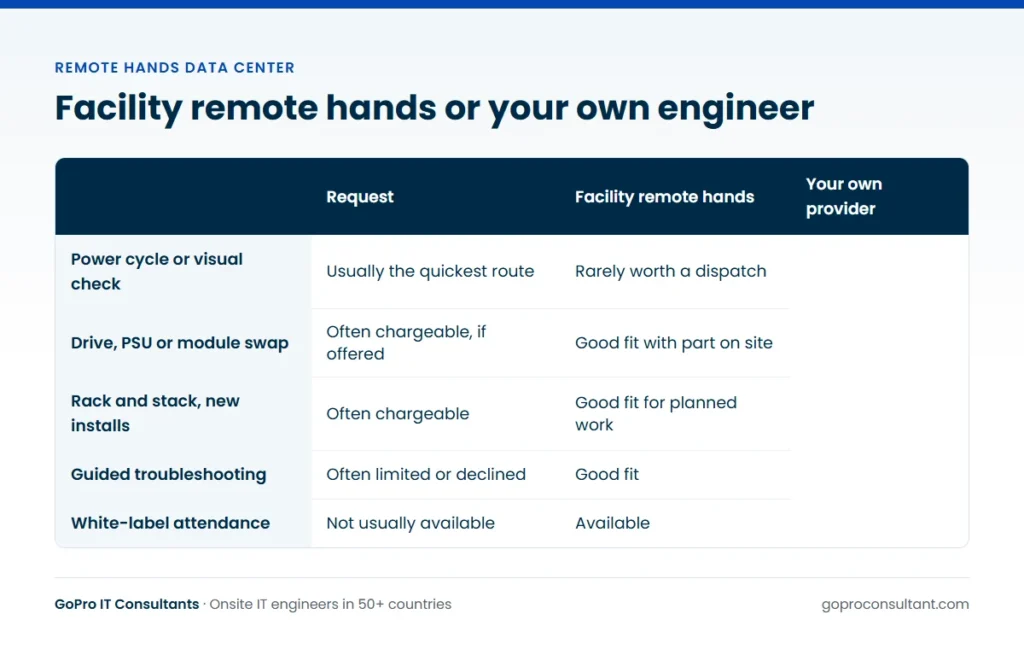
Many teams use both. They keep included remote hands for power cycles and visual checks, and send their own engineer for anything that takes more than a few minutes. That keeps the allowance for the jobs it suits. A common split is the facility receiving the replacement part into your cage, and your engineer arriving at an agreed time to fit it, with your remote team on the phone to confirm the result.
A worked scenario: one fault, two routes
Say a customer’s application server in a colocation cage stops responding early one evening. Your monitoring shows the host down, and the out-of-band management interface isn’t answering either. Here’s how the work typically splits.
Step one: included remote hands. You raise a request with the facility for a visual check of the named server: power LEDs, any amber lights, and whether the management cable is seated. You ask for a photo of the front and rear if the site allows it. Then, with the customer’s approval, a power cycle. These are the quick, low-risk tasks the included service exists for, and the facility team is already in the building.
Step two: read the result. The server comes back, but the photo shows an amber health light on the front panel, and once the management interface is up your team sees memory errors logged against one DIMM. That’s no longer a remote hands task. It’s a hardware fault, with a part to order and a swap that needs the server powered down.
Step three: order the part and book the engineer. The server is running again, so the customer agrees a short outage window the next day. You ask the vendor to ship a replacement DIMM to the facility under your account, and book a scheduled visit for that window through field engineer dispatch. The engineer’s name goes on the access list the same evening.
Step four: the facility receives, the engineer fits. The facility’s goods-in team logs the delivery against your reference. The engineer collects it, confirms the part number, waits for your remote contact to shut the server down, swaps the DIMM in the slot named in the ticket, and stays until the contact confirms the server has booted cleanly with the full memory count.
Step five: close it out. The report covers photos, the part numbers and serials in and out, LED status and the packed failed DIMM ready for return. Each party did the part of the job it’s best placed for. The included service did its job, and the chargeable work went to someone set up for break/fix support. If you want the visit itself to run cleanly, the pre-visit checklist for data centre smart hands covers what to confirm before the engineer travels.
Glossary of colocation support terms
Providers use these terms slightly differently, so treat the definitions as general and check how your own agreement uses them.
Remote hands: simple physical tasks done by the facility’s staff on request, such as power cycles and visual checks. Smart hands: more involved technical work, such as hardware swaps, rack and stack and cabling, either from the facility as a chargeable service or from an independent provider. Cage, suite and cabinet: the levels of space you rent, from a locked area of the hall down to a single rack.
Cross-connect: a physical cable between your space and another customer or carrier in the building, usually ordered from the operator as a separate service. Meet-me room: the area where carriers and customers interconnect. Goods-in: the facility’s delivery receiving point, which holds parts against a reference until someone collects them.
Access list: the named people allowed into your space, registered under your account. Work order or request reference: the facility’s number for a task, which the engineer may need at security. RMA: the vendor’s return authorisation for a failed part, which tells the engineer how to pack and label it.
Setting up an independent provider before you need one
The worst time to find a field partner is during an outage. Agree the basics in advance: the sites, the response tiers you need at each, the access process for each facility and the report format. GoPro IT Consultants offers 4-hour response in major cities across the UK, Western Europe, the Gulf, Australia, Singapore and the USA, plus same business day, next business day and scheduled visits. Pricing is per ticket or by day rate and depends on country and tier, so ask for a quote against your real site list.
Our data centre support and smart hands page covers the tasks we take on, and the global coverage page lists where engineers are available. The simplest way to test the fit is a single pilot ticket at one of your sites.
Frequently asked questions
Do I need the facility's permission to bring my own engineer?
Yes. The facility controls access, so your engineer must be added to the access list under your account and follow the site's induction and visitor rules.
Can my own provider and the facility's team work on the same request?
Yes, as long as the ticket says clearly who does what and who the facility should take instructions from during the visit.
Who is responsible if the facility's staff make a mistake during remote hands?
That depends on the terms in your colocation agreement. Check the liability and service sections of your own contract, because they differ between providers.
Is remote hands suitable for configuration changes?
Generally not. Facility staff work to explicit physical instructions, so configuration is usually done remotely by your team or by an engineer you send.
Need an engineer at a colo your provider can't cover?
Send us one pilot ticket for a single site. No minimum commitment, and a full site visit report within 24 hours.
Request a pilot ticket