

If you’ve got kit in an Equinix facility, sooner or later you’ll need someone to touch it. Equinix, like most large colocation providers, sells its own smart hands service for exactly that. The question most IT teams end up asking is about Equinix smart hands cost over a whole year, not per ticket, and whether an independent provider would do the same work for less, or do more of it.
We can’t tell you Equinix’s rates. They depend on your contract, the site and the country, and they change, so the only reliable source is your own order form or the Equinix customer portal. What we can do is explain how colocation smart hands are usually charged, where the costs creep in, and when bringing in your own engineer makes sense.
How colocation smart hands are usually charged
Most colocation operators, Equinix included, sell smart hands in one of three ways. Your contract will say which applies to you.
- On demand. You raise a request through the portal and pay for the time used, typically with a minimum charge per request.
- Prepaid bundles. You buy a block of hours or a monthly allowance in advance, usually at a better rate than on demand, and draw it down as you go.
- Scheduled work. Planned jobs booked ahead, which are often priced differently from urgent requests.
On top of that, expect different charges for working hours and out-of-hours work, and for standard against expedited requests. Before you compare anything, pull the actual figures from your agreement: the minimum time per request, how partial hours are rounded, and what counts as out of hours.
Where Equinix smart hands cost adds up
The headline hourly figure rarely tells the whole story. When teams review a year of colocation smart hands invoices, the cost usually comes from a few patterns rather than from any one big job.
Lots of small requests
If every request carries a minimum charge, ten quick tasks spread across ten separate tickets cost far more than the same ten tasks done in one visit. A reseat here, a photo there, a label fixed next week: it adds up.
Urgent work that didn’t need to be urgent
Expedited or out-of-hours requests are the right call when a service is down. They’re an expensive habit when the task could have waited for the next scheduled visit.
Back-and-forth on vague tickets
Facility technicians follow your instructions closely, and they should. If the ticket says “check the server in rack 12” without saying which unit, what to check or what to do next, you’ll pay for the time it takes to find out.
Work that’s bigger than smart hands
A full rack build, a migration weekend or a cabling audit can be done through colocation smart hands, but billed by the hour it can get costly. These are often better quoted as a project.
Colocation smart hands vs an independent provider
Neither option is always cheaper. They suit different jobs.
| Colocation smart hands | Independent provider | |
|---|---|---|
| Already in the building | Yes | No, the engineer travels in and is added to your access list |
| Best for | Quick tasks and urgent checks | Planned work, projects, multi-site estates |
| Covers your offices and branches too | No, only that facility | Yes, the same engineer pool can go anywhere |
| Works under your brand | Not usually | Often, if you ask |
| Report format | The facility’s own | Usually yours, if you supply a template |
Being in the building is a real advantage. If a server needs a power cycle at 2am and the facility tech can be there in minutes, that’s hard to beat. Where independent providers tend to win is planned work, longer jobs, and estates spread across facilities run by different operators, where one engineer pool and one report format save a lot of admin. Our data centre support is built around exactly that kind of work.
Can you bring your own engineer into an Equinix facility?
In most colocation facilities, yes. Customers routinely let their own staff and contractors work in their cage or cabinet. What you have to do is register the visitor under your account in advance, following the facility’s own access process, so the engineer can get through security with photo ID. Each operator, and sometimes each site, has its own rules on notice periods, escorts and what can be brought in. Check your facility’s customer guide before you book anyone.
Once access is sorted, the rest is just a normal visit. The engineer follows your instructions, works in your space only, and sends a report afterwards.
Questions to ask before you compare quotes
Comparing a colocation price list with an independent quote only works if you’re comparing the same thing. Before you put two numbers side by side, get answers to these:
- Is there a minimum charge per request, and how are part hours rounded?
- Does the clock start at dispatch, at arrival or when work begins?
- What counts as out of hours, and how much more does it cost?
- Who handles parts deliveries, and is receiving them charged separately?
- What does the report include, and how quickly do you get it?
The cheapest hourly figure can easily turn out more expensive once minimums and rounding are applied to the way you actually use the service.
How to build a like-for-like cost comparison
Comparing an hourly figure from one supplier with a ticket price from another tells you very little. Compare the same set of real jobs, priced the way each supplier would actually bill them. A method that works:
- Export twelve months of requests from the colocation portal, with dates, times, duration billed and a one-line description of each. Twelve months smooths out the odd busy quarter.
- Tag each request as urgent or planned, short or long, and in hours or out of hours. Be honest: a request raised as urgent because nobody planned ahead is still planned work.
- Re-price the history under your own contract terms. Apply your minimum charge, rounding and out-of-hours rules to each line, so you know what the current pattern really costs.
- Ask an independent provider to quote the planned work using the same task list, the response tier each task needs and the site address. Ask for the quote per ticket and by day rate, so you can see which fits your pattern.
- Add the costs of each route that don’t appear on the invoice, covered below, such as access registration and the time your team spends coordinating.
- Compare the split, not the extremes. The answer is rarely all one or all the other. Work out the cost of keeping urgent work with the facility and moving planned work out.
A worked comparison: one facility, one year of requests
Say you look after a customer’s two racks in a large colocation facility, and the export shows a steady stream of requests across the year. When you tag them, a typical pattern appears. A handful were real outages: a hung server at night, a switch that needed a power cycle. A larger group were small planned tasks spread across separate tickets: a label fixed here, a cable reseated there, a set of photos for an audit. And a few were bigger jobs, such as racking three new servers and a cabling tidy, which ran for several hours each on hourly billing.
Re-priced under your contract terms, the outages look like good value. Someone was at the rack within minutes, and that’s what the facility’s own team is best at. The small planned tasks look worst, because each carried its own minimum charge. The big jobs sit in between, but they were also the ones where you most wanted a proper report and a consistent cabling standard.
So the sensible split here is clear. Keep the outages with the facility. Batch the small tasks into a monthly scheduled visit by an independent engineer, booked as one ticket or a short day. Quote the bigger jobs as projects. You’d only know which way the numbers fall by running your own figures, but this shape of result is common, and it’s why so many teams end up using both.
Costs that don’t appear on either invoice
An honest comparison counts the work your own team does around each visit, not just what the supplier bills.
With the facility’s own team
Requests that need several rounds of clarification through the portal tie up your NOC. Reports in the facility’s format may need rewriting before your customer sees them. And when the task turns out to need more judgement than the request allowed for, you often end up raising a second request, or a dispatch, anyway.
With an independent provider
Someone on your side has to register each visitor with the facility and keep the access list current. Deliveries need a clear release reference so the engineer can collect them. Travel adds lead time, so a planned visit needs booking ahead rather than on the hour. None of this is hard, but it’s real time, and it belongs in the comparison.
Both routes share one cost: rework from poor documentation. An out-of-date rack diagram slows down a facility technician and an independent engineer equally.
How to cut your smart hands bill either way
Whichever route you take, the same habits bring the cost down:
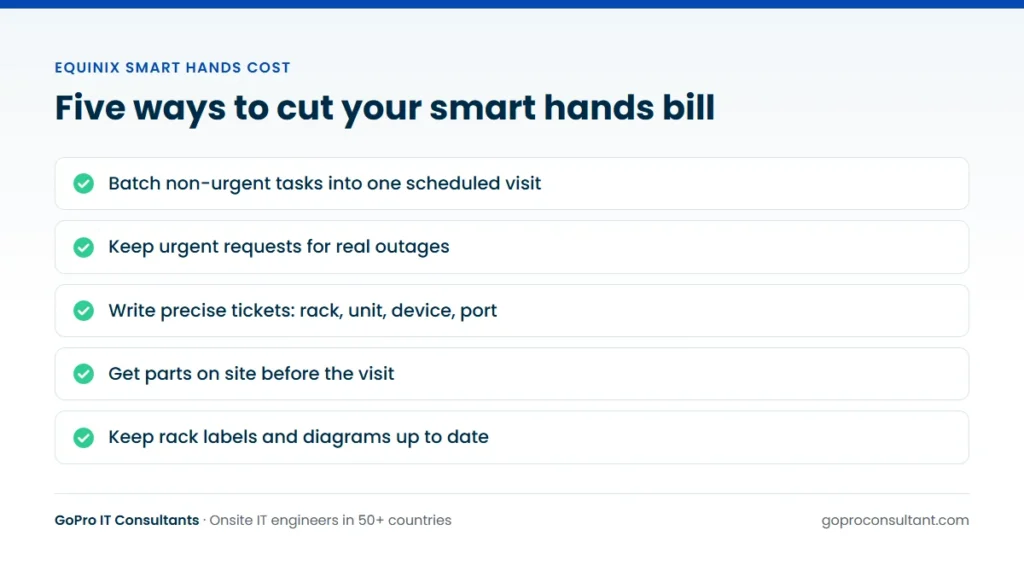
- Batch non-urgent tasks into one scheduled visit a week or a month.
- Keep urgent requests for real outages, not for things that can wait until morning.
- Write precise tickets: rack, unit, device name, port, what to do and what “done” looks like.
- Get parts on site before the visit, with the delivery reference in the ticket.
- Keep your rack documentation current, because good labels and an accurate rack diagram save time on every job.
We go through what a good ticket looks like in how to scope a smart hands support ticket.
Running both routes day to day
A split only saves money if your NOC knows which route to pick without debating it each time. Write a one-line rule per site into the runbook. A common version: if the task takes a few minutes, needs no judgement and can’t wait, raise it with the facility. If it can wait for the next scheduled visit, add it to that visit’s list. If it needs diagnosis, a part swap with checks, or more than an hour of work, book your own engineer.
The two routes also work well together on the same job. The facility receives the part into your cage, your engineer fits it at an agreed time, and your remote team confirms the result. If you’re unsure which level of service a task needs, our comparison of smart hands, remote hands and field engineers sets out the differences. Where your customer expects the engineer to arrive as part of your team, book the planned work as white-label IT services, with your badge and your report template.
Estates spread across operators and countries
The cost picture changes once your customers’ kit sits in facilities run by several operators, or in several countries. Each operator has its own portal, its own request types, its own terms and its own report format. Your service desk has to learn each one, and your customer gets reports that look different depending on where the kit happens to live.
An independent provider replaces that with one ticket format, one report template and one point of contact, whichever facility the engineer walks into. The facility’s own team still has a role, especially for urgent checks, and you still need to follow each site’s access rules. But the planned work, which is usually most of the volume, runs through one process.
Two practical points for multi-country estates. Check each facility’s notice period for registering visitors, because it sets how far ahead you can book planned work there. And state times in the site’s local time zone on every ticket. If the estate also includes a refresh or a migration across several sites, it may be better run as a multi-site rollout with a pilot site and waves than as a string of separate tickets. For what the facility’s included service usually covers before chargeable work starts, see what colocation remote hands includes.
When an independent provider is worth a look
Review your last six or twelve months of smart hands requests. If most of them were planned rather than urgent, if they came in clusters, or if you also send engineers to offices and branches near your data centres, it’s worth getting a quote from an independent provider for that planned work. Keep colocation smart hands for the genuinely urgent stuff. Many teams end up using both, and that’s usually the cheapest setup overall.
If you want to test it, send us one planned job in one facility. You’ll see the response, the engineer and the report before deciding anything. We work in data centres and server rooms through our network in 50+ countries, and engineers can attend under your brand if your client expects that. For the basics of what smart hands work covers, see what smart hands services include.
Frequently asked questions
Where can I find my Equinix smart hands rates?
Your order form, contract and the Equinix customer portal show the rates and minimum charges that apply to your account and site. Rates vary by country and contract, so use your own figures.
Does an outside engineer need an escort in a colocation facility?
It depends on the operator and the site. Many let registered customer contractors work in their own cage or cabinet without an escort, but check the facility's customer guide before booking.
Can I use both colocation smart hands and an independent provider?
Yes, and many teams do. A common split is the facility's own staff for urgent checks and an independent provider for planned work, projects and other sites.
Does batching small requests really lower the bill?
Often, yes, where each request carries a minimum charge. Grouping non-urgent tasks into one scheduled visit means you meet that minimum once instead of on every task.
Planned work in a colocation facility?
Send us one planned job. Our engineers work in data centres and server rooms in 50+ countries, under your brand if you need.
Get a quote