

Network break fix in the field is a split job. Your NOC owns the configuration, the diagnosis and the decision to swap. The field engineer is the pair of hands in the comms room: they check the physical layer, give the NOC console access, swap the switch, router or firewall when told to, and re-patch it exactly as it was. Get that split clear and most network visits are short.
This post covers what an onsite engineer can and can’t usefully do on network kit, how console access works, and how to run the visit alongside the NOC so nobody is guessing.
What network break fix looks like on site
Typical tickets are a branch switch that’s stopped forwarding, a router that won’t come back after a power cut, a firewall stuck in a boot loop, or a failed PSU or fan in a core switch. Sometimes it’s simpler: a transceiver has died, a patch lead has been pulled, or someone has plugged both ends of a cable into the same switch.
For many of these, the cheapest fix is a set of eyes on the kit. Remote monitoring tells you a device is unreachable. It can’t tell you the cabinet door is open, the UPS is beeping and the switch has no lights at all. That’s why break and fix support for networks still needs people on the ground, even when the NOC can see everything else.
What the engineer can and can’t do
The clearest way to scope network visits is to split tasks between the person on site and the person on the console.
| Field engineer on site | NOC or remote engineer |
|---|---|
| Check power, LEDs, fans and cabling | Read logs and interface counters |
| Connect a console cable and laptop | Log in and run diagnostics |
| Reseat or swap transceivers, PSUs, fans | Decide which part or unit to replace |
| Swap the chassis and re-patch it | Push the config and firmware |
| Photograph and label ports | Confirm services are back |
| Collect serials for the RMA | Raise and manage the RMA |
Some field engineers are network-capable and can run commands under direction. That’s useful, but write it into the ticket rather than assuming it. The default should be: the engineer doesn’t change configuration unless your NOC asks them to, step by step, and the change is recorded in the report.
Console access and out-of-band options
When a device is down, the network path to it usually is too. That makes the console port the most important thing the engineer brings. Tell them in the ticket what they need:
- Console cable type: RJ45 rollover, USB-C, mini-USB or DB9, plus a USB-to-serial adapter
- Terminal settings, if they differ from the vendor default
- How the NOC will reach the console: a screen-share session from the engineer’s laptop, a 4G hotspot, or a local out-of-band device
- Whether the engineer needs a known-good laptop image or specific software
If the site has an out-of-band console server or a cellular backup router, put its details in the ticket. It can mean the engineer only needs to reseat a cable or power-cycle a unit while your team does the rest remotely. Don’t hand passwords to the engineer by email or ticket text. Have the NOC type them in a controlled remote session, or change them after the visit.
Working with the NOC during the visit
A network visit goes well when the engineer and NOC are on a call together from the moment the engineer is in the room. Agree a contact before dispatch, with a direct number or bridge, not a general queue. The engineer should be able to reach a named person within minutes, because standing in a hot comms room waiting for a callback is how short jobs become long ones.
Run the visit in a fixed order: the engineer reports what they see, the NOC decides, the engineer acts, the NOC confirms. Each action gets a time and goes in the report. If the change window is out of hours, book a scheduled visit for that window rather than hoping a same-day engineer arrives at the right moment.
If you run a managed network for clients and don’t have your own NOC in a region, our managed network services page explains how we can cover both the remote and onsite sides.
A worked scenario: half an office offline before opening
Say your NOC sees one member of a two-switch stack drop out at a regional office at 07:40. Half the desks and two access points hang off it, and the office opens at 08:30. The last log entry before it dropped mentions a power event.
The NOC raises a 4-hour ticket. Because the cause could be the switch’s power supply or the switch itself, it ships a spare PSU and a like-for-like switch to site, and puts the stack member number, cabinet location and console details in the ticket. The office manager is asked to leave the comms room open.
The engineer arrives, joins the NOC bridge and reports what they see before touching anything: the stack member has no lights at all, and neither does the power strip it’s plugged into. The other stack member and the router are on a different strip fed from the UPS. With the NOC’s agreement, the engineer moves the switch’s power lead to a free outlet on the live strip. The switch boots, rejoins the stack, and the NOC confirms the ports and both access points are back.
The report shows the cabinet as found, the dead strip, the outlet now in use and the time services returned. It recommends replacing the power strip and moving everything onto UPS-backed power. The spare PSU and switch go back unused. Nothing was configured on site, and the visit took less time than the drive. That’s a common outcome when the engineer starts with the physical layer.
Swapping a switch, router or firewall
A like-for-like chassis swap is the job most likely to go wrong in a small way that causes a large outage. The usual cause is re-patching. Before touching anything, the engineer should photograph the front and back of the device, record which cable goes in which port, and label any unlabelled leads. Transceivers usually move from the old unit to the new one, unless one is the fault.
Then the config. Replacement units normally arrive with a factory config and possibly different firmware. Your NOC pushes the saved config, matches the firmware and re-applies licences, which on some firewalls are tied to the serial number and need transferring through the vendor. Check that before the visit, not during it. Stacked switches need care too: the new member must join the stack at the right priority and firmware level.
The engineer records the old and new serials for the RMA and packs the failed unit for return. Hardware swaps on network kit follow the same parts rules as other hardware, covered in our post on onsite hardware part swaps.
Physical-layer checks before anyone swaps hardware
Plenty of “device down” tickets end without a swap, because the fault was in the power, the cabling or the optics. Ask the engineer to work through the physical layer and report it to the NOC before any replacement unit comes out of its box.
| Symptom the NOC sees | Often turns out to be | What the engineer checks |
|---|---|---|
| Device unreachable, no logs | Lost power, tripped PDU or failed strip | Device and PSU LEDs, outlet, UPS status |
| Uplink down, device otherwise fine | Failed transceiver or damaged fibre lead | Optic seating, link lights, a known-good lead |
| Interface errors climbing | Damaged patch lead or bad termination | Swap the lead, test the permanent link if a tester is on site |
| Broadcast storm or flapping ports | A loop from a cable plugged in twice | Trace and photograph the patching |
| Random reboots | Overheating or a failing fan | Fan status, airflow, blocked vents, room temperature |
| Router up, no internet | Carrier circuit fault | Lights on the carrier’s terminating equipment |
None of these checks needs configuration access, and all of them can be photographed. If the physical layer is clean, the NOC can approve the swap knowing it’s needed. If cabling problems keep showing up at the same site, the cabinet itself may need work, which we cover in our guide to network cabinet setup.
Common mistakes on network visits
No current configuration backup
A like-for-like swap is only quick if the NOC has a recent saved config for the failed unit. Check backups exist before you need them, especially for branch kit that was set up once and never touched again.
Optics the new unit won’t accept
Some vendors’ switches reject or warn about third-party transceivers. If the site uses them, confirm the replacement will accept the existing optics, or ship compatible ones with it.
Blaming the router for a carrier fault
When the WAN is down, the router is the obvious suspect, but the fault is often on the carrier’s side of the demarcation point. Have the engineer photograph the carrier’s terminating equipment and its lights, so you can open a ticket with the carrier straight away instead of swapping a healthy router.
Changing several things at once
Reseating a transceiver, swapping a patch lead and power-cycling the switch in one go may clear the fault, but nobody learns which one did it. One change, one check, one entry in the report.
Leaving access behind
A console session left logged in, a laptop still connected, or a temporary password never changed is a security gap. The last step on every visit is to log out, disconnect, and have the NOC confirm that any temporary credentials have been changed.
What to put in a network ticket before dispatch
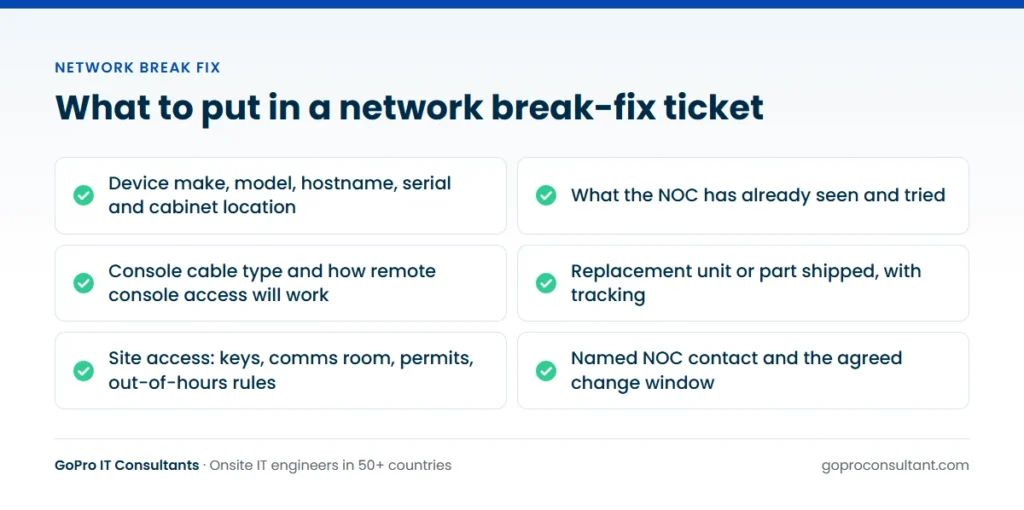
A good network ticket lets the engineer arrive with the right cable, find the right cabinet and start work at once. Include:
- Device make, model, hostname and serial, plus rack or cabinet location
- What the NOC has already seen and tried
- Console cable type and how remote access to the console will work
- Whether a replacement unit or part has shipped, with tracking
- Site access: keys, comms room location, permits, out-of-hours rules
- NOC contact and the agreed change window
What the visit report should show for network work
Every visit gets a site visit report within 24 hours, and for network work its contents decide whether the next fault at that site is quick or slow. Ask for:
- Photos of the cabinet and device front and back, as found and as left
- A port map of what was connected where, if the device was swapped or re-patched
- Old and new serials, plus any transceivers moved or replaced
- A timed log of each action and who on the NOC approved it
- Anything the engineer noticed but didn’t touch, such as unlabelled leads or kit on non-UPS power
- What’s outstanding, and whether a return visit is needed
If you work white-label, the report can go out on your template and the engineer attends under your brand, as described on our white-label IT services page.
Network estates across many sites and countries
For a retailer, bank or logistics business with dozens of branches, the hard part is consistency. The same switch model may be cabled differently in every branch, and the person with the comms room key changes by shift. Keep one visit playbook for the whole estate: the same ticket fields, the same order of checks, the same report. Then add the local detail per site.
Across countries, a few things change. Change windows are set in local time, which matters when your NOC sits several time zones away and the only safe window is after the store closes. Some buildings only allow contractors at certain hours, and landlords may control the riser or the carrier’s room. Spares take longer to cross borders, so a regional stock of the most common switch and router models shortens a lot of tickets. And the engineer needs to be able to talk to site staff, so state the language in the ticket. We dispatch engineers in 50+ countries, and our global coverage page shows where. For planned work on new kit rather than faults, see our guide to network switch installation.
Site realities to plan for
Comms rooms in branches and shops are rarely tidy. Expect locked cabinets with no key on site, kit sitting on top of a cabinet rather than in it, unlabelled patching, and landlords’ risers that need a separate permit. A wireless controller or access points may hang off the failed switch, so a switch outage looks like a Wi-Fi problem to the client. If the fault keeps coming back, it may be coverage or design rather than hardware, and a wireless site survey is the better next step.
The as-found and as-left photos in the report give your NOC a current picture of the site for the next fault, and they’re often the first accurate record of a branch comms room anyone has had. For coverage and response options by city, see our field engineer dispatch page. Network break fix done this way is mostly about preparation: the work on site should be the easy part.
Frequently asked questions
Will the field engineer configure the replacement device?
Normally your NOC pushes the configuration and firmware. The engineer connects the console, swaps and re-patches the unit, and only runs commands if your team directs it.
Should we give the engineer device passwords?
It's safer not to. Have your NOC log in through a controlled remote session, or change credentials after the visit.
Can the visit be booked inside our change window?
Yes. A scheduled visit can be booked for an agreed date and time, including nights and weekends.
Who handles the RMA for the failed unit?
Your team or the vendor raises and manages the RMA. The engineer records old and new serials and packs the failed unit for return.
Need hands on a switch or firewall?
We dispatch field engineers to work with your NOC on network faults, with a site visit report within 24 hours.
Request an engineer