

POS installation services cover everything an engineer does in a store to take new point-of-sale kit from boxes on the stockroom floor to a till that trades: unboxing and mounting terminals, connecting receipt printers, cash drawers, card readers, scanners and scales, checking power and network, testing with the POS vendor’s support desk, and taking the old kit away. For a single shop that’s a morning’s work. Across a few hundred stores, it’s a project with its own logistics, timings and failure points.
This post is the overview. It sets out what a well-run multi-site job actually involves on site, what you should expect from the engineer, and where these projects usually go wrong, so you can scope the work properly before anyone travels.
What POS installation services include on site
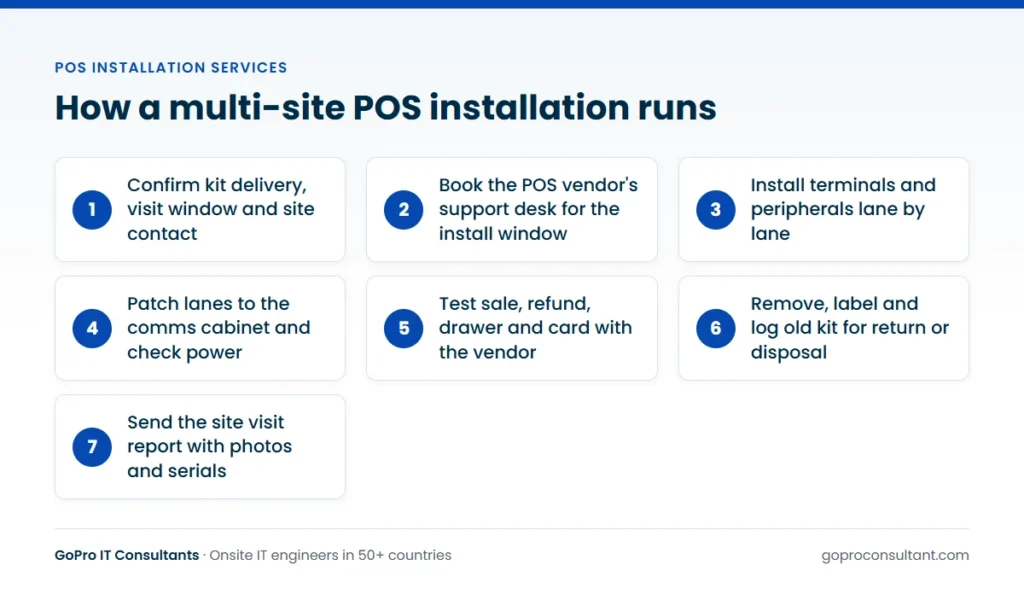
Most retail point of sale installation work follows the same pattern, whatever the software platform. The engineer arrives, signs in with the store manager, checks the delivery against the site pack and then works lane by lane so the store can keep trading on the tills that haven’t been touched yet.
The typical scope per lane looks like this:
- Terminal: mount the all-in-one or the base unit and display, fit any customer-facing screen, tidy and label cables.
- Peripherals: connect the receipt printer, cash drawer (usually triggered from the printer), handheld or flatbed scanner, and the scale on counters that sell by weight.
- Card reader: pair or cable the payment terminal and confirm it talks to the POS. Payment configuration itself normally sits with the acquirer or the POS vendor, not the engineer.
- Network: patch each lane back to the comms cabinet, confirm link lights and IP addressing, and check the switch port is in the right VLAN.
- Power: check there are enough sockets at the counter, that nothing is running off a daisy-chained extension lead, and that UPS units (if specified) are connected.
- Testing: run a test sale, a refund, a drawer open and a card transaction with the vendor’s support desk on the phone.
- Removal: disconnect, bag and label the old kit for return or disposal.
Our EPOS installation and support service is built around that scope, with the engineer working to your site pack and reporting back against it.
Who does what: you, the POS vendor and the engineer
The single biggest cause of wasted visits is confusion over who owns which task. The engineer is the pair of hands in the store. The POS vendor owns the software, the images and the remote configuration. You (the integrator, MSP or vendor running the programme) own the plan, the parts and the store communication.
| Task | Usually owned by |
|---|---|
| Store schedule and manager sign-off | Programme owner (you) |
| Shipping kit to site before the visit | You or the hardware vendor |
| Software image, licences, store configuration | POS vendor |
| Physical install, cabling, peripherals, testing on site | Field engineer |
| Remote checks during the test sale | POS vendor support desk |
| Collection and disposal of old kit | You, with a disposal partner |
Write this split into the job brief. If the engineer is expected to re-image a terminal, enter a store ID or pair a card reader to a merchant account, say so and give them the credentials process in advance rather than on the night.
Night and early-morning installs
Retailers rarely want tills out of action during trading. A common pattern is to start after close (or a few hours before opening) and have every lane tested before the first customer. That shapes the whole job.
- Access: someone has to let the engineer in, disarm the alarm and stay, or hand over keys under the store’s own process. Confirm the name and number of that person the day before.
- Vendor support hours: if the POS vendor’s desk closes at midnight, a 2am test sale has nobody to confirm it. Book their engineer or out-of-hours line for the same window.
- Fallback: decide in advance what happens if a lane fails testing. Most programmes leave one old till trading until the new one is proven.
- Handover: the opening manager needs a short note: which lanes are live, anything outstanding, and who to call.
We book scheduled visits for an agreed date and time, including nights and weekends, which is how most of this work runs.
Pilot first, then waves
Don’t send the full programme out on day one. Pick a pilot store that’s typical (not your flagship, not your smallest), install it, and use what you learn to fix the site pack. Pilots usually turn up something: a missing bracket, a printer driver that needs a different setting, a cabinet with no spare switch ports, a scale that needs a different cable.
After the pilot, run the remaining stores in waves. Each wave should be small enough that a problem in store three doesn’t repeat in forty stores before anyone notices. Our multi-site rollout service works this way, with a daily tracker showing each store’s status, photos and serial numbers. For the planning side in more detail, the IT rollout checklist covers the pre-wave work that applies to any estate.
A typical store from booking to sign-off
It helps to see one store end to end, because that’s the unit everything else is built from. Say you’re running a till replacement for a grocery chain with a few hundred stores, and tonight’s site is a mid-size format: six lanes, a scanner-scale on two of them, a customer display on every counter and a back-office PC in the cash office.
Two weeks out
The store gets its date in the wave plan and the manager is told. The kit is shipped to arrive several days before the visit, not the afternoon of it, and the manager sends back a photo of the boxes in the stockroom. Your coordinator checks the box count against the lane plan. If a scale is missing, there’s still time to ship another one.
The day before
The coordinator confirms the keyholder’s name and number, the time the store closes and the time it must be trading again. The POS vendor’s support desk is booked for the same window and the reference goes into the engineer’s brief, along with the lane plan, the test script and the instructions for old kit.
On the night
The engineer walks the store before unpacking and finds that the network drop at lane five gives no link. That’s reported straight away, not at the end of the shift. The coordinator decides lane five keeps its old till for now, and asks the network team to check the switch port remotely while the engineer carries on with the other five lanes. Each new lane passes the test script with the vendor’s desk, the old kit comes off with its serial numbers logged, and lane five is retested once the port has been checked. It still has no link, so the fault is in the cabling, not the switch.
The morning after
The opening manager finds a handover note: five new lanes live, lane five on the old till, who to call if anything misbehaves. The site visit report follows within 24 hours with photos of every lane and the cabinet, serials in and out, and the dead drop written up clearly. Your tracker shows the store as complete with one open item. A cabling fix and the lane five install go in as a new ticket, and the store questionnaire for the next wave gets an extra line asking managers to confirm every counter has a working network point. That last step is the real value of a well-run store: each one makes the next wave a little cleaner.
What to prepare before an engineer travels
Many failed POS installation visits fail before the engineer sets off. Kit hasn’t arrived, the store didn’t know the visit was booked, or the comms cabinet is locked and nobody has the key. A short pre-visit check removes most of that.
- Confirm delivery of every box, ideally with a photo of the stock in the store.
- Confirm the visit window, the site contact and the out-of-hours access process.
- Send a lane plan: which counter gets which terminal, printer, drawer and scale.
- Confirm comms cabinet access and spare switch ports, or ship a switch.
- Book the POS vendor’s support window and share the reference number with the engineer.
- Agree what happens to old kit: returned to you, held for collection, or handed to a disposal partner.
The on-the-night version of this, lane by lane, is in our EPOS installation checklist for store rollouts.
Running POS installs across several countries
An estate that crosses borders adds a layer of planning that a single-country rollout doesn’t need. The on-site work is the same. The things around it are not.
Store access and local processes
Keyholding, alarm codes and security guard arrangements vary from country to country and often from landlord to landlord. Stores in shopping centres may need the engineer registered with centre management in advance, with a named contractor pass, before any out-of-hours entry. Collect those requirements per store, not per country, and put them in the brief.
Kit variants and power
The same terminal model often ships with different power leads, keyboard layouts or card readers in different markets. Check the regional variant is the one on the pallet, and that the lane plan reflects local counters. A scale certified for use in one country isn’t automatically the right unit for another, so let your hardware vendor confirm the model per market.
Language, time zones and vendor support
Store staff will want the handover note in their own language, and the engineer needs to be able to talk to the night manager. Your report, though, should come back in one language and one format across the estate. Watch the vendor’s support hours too: a desk run from another time zone may be closing just as a night install in your market gets to testing.
Parts and shipping
Cross-border shipments can sit in customs for longer than planned, so build that lead time into the wave plan and make kit arrival a gate for confirming each visit. Agree in advance where replacement parts for failed lanes will ship from, because a dead printer in one country shouldn’t wait on stock held in another. Our global coverage page shows where our engineer network operates.
Old kit, disposal and data
Old terminals carry more data than people expect: local transaction logs, cached customer details, user accounts and network settings. Card readers have their own return processes, often set by the acquirer or the terminal owner, so check before anyone bins one.
Decide early whether old kit goes back to a depot, gets redeployed or is retired. If it’s retired, the engineer should record serial numbers as it comes off the counter so the disposal record matches the asset list. We can route retired equipment through IT asset disposition with certified recycling partners, which gives you a documented chain from store to recycler.
Reporting, white-label work and return visits
For each store you should get a site visit report within 24 hours: photos of each lane and the cabinet, serial numbers in and out, what was done and anything left open. That report is what lets you close the store on your tracker and bill your own client.
If you’re delivering under your own brand, the engineer can wear your badge, use your report template and keep any commercial questions from store staff for you. If something can’t be finished, say a scale arrives damaged or the network drop to a lane is dead, the engineer records what was found and what’s needed, and the return visit goes in as a new ticket once the parts are on site. That keeps your tracker honest and stops a half-finished store being marked complete.
POS terms you’ll meet in a site pack
Retail programmes come with their own vocabulary, and different vendors use different words for the same thing. These are the ones worth agreeing on before the first brief goes out.
- Lane: one checkout position with its own terminal and peripherals. Self-checkout units are usually counted separately.
- Site pack: the per-store document with address, contacts, access, kit list, lane plan and test script.
- Lane plan: which device goes on which counter, often with a sketch of the store front.
- Scanner-scale: a flatbed scanner with a built-in weighing plate, common on grocery lanes.
- PED or payment terminal: the card reader. Its configuration and returns usually belong to the acquirer or terminal owner.
- Cash recycler: a drawer replacement that accepts and dispenses notes and coins, with its own install steps.
- Enrolment: registering a new terminal with the POS back end, normally done remotely by the vendor.
- Wave: a batch of stores installed in the same period after the pilot.
- Hypercare: the days straight after go-live, when faults get faster attention while the new lanes settle.
How GoPro IT Consultants delivers POS installation services
We supply the engineers for the store work: scheduled visits on an agreed date and time, including nights and weekends, with a site visit report within 24 hours. Engineers are screened for skills, identity, right to work and references, and briefed on your site pack before each store. If an engineer can’t attend, a backup is assigned and you’re told straight away. For faults found in the days after go-live, our 4-hour response covers major cities across the UK, Western Europe, the Gulf, Australia, Singapore and the USA, with same business day and next business day tiers elsewhere.
Most of this work is delivered under the partner’s brand, which is how our white-label IT services are set up. Hardware and parts come from you or your vendor, and any return visit is a new ticket.
If you’re weighing up who should do the work, how to choose POS installation companies for a rollout goes through the questions to ask, and what drives POS system installation cost covers what to put in the scope so quotes compare. And if you want to see how we handle one store before committing to a programme, a single pilot ticket is the usual way to start.
Frequently asked questions
Can your engineers configure the POS software as well as install the hardware?
The engineer handles the physical install, cabling, peripherals and on-site testing. Software images, licences and store configuration normally stay with the POS vendor, though the engineer can follow a scripted setup if you provide one.
Can the engineer work under our company's brand?
Yes. Engineers can wear your badge, use your report template and refer any commercial questions from store staff back to you.
What happens if a lane can't be finished on the night?
The engineer records what was found and what's needed in the site visit report. Once parts or access are sorted, the return visit is booked as a new ticket.
Do you supply the POS hardware?
No. The hardware is shipped to site by you or your vendor, and the engineer checks the delivery against the site pack on arrival.
Need POS kit installed across your stores?
Start with one pilot ticket, no minimum commitment. Scheduled night and weekend visits, with a report within 24 hours.
Book a pilot store