
Choosing between POS installation companies for a multi-store rollout is less about who has the slickest proposal and more about who can turn up at store 147 at 11pm with the right brief, finish every lane, test with your POS vendor and send you a usable report by the next day. That’s the job. Everything in this checklist is a way of finding out, before you sign, whether a partner can actually do it.
It’s written for integrators, MSPs and POS vendors buying installation capacity, not for a single retailer buying a till.
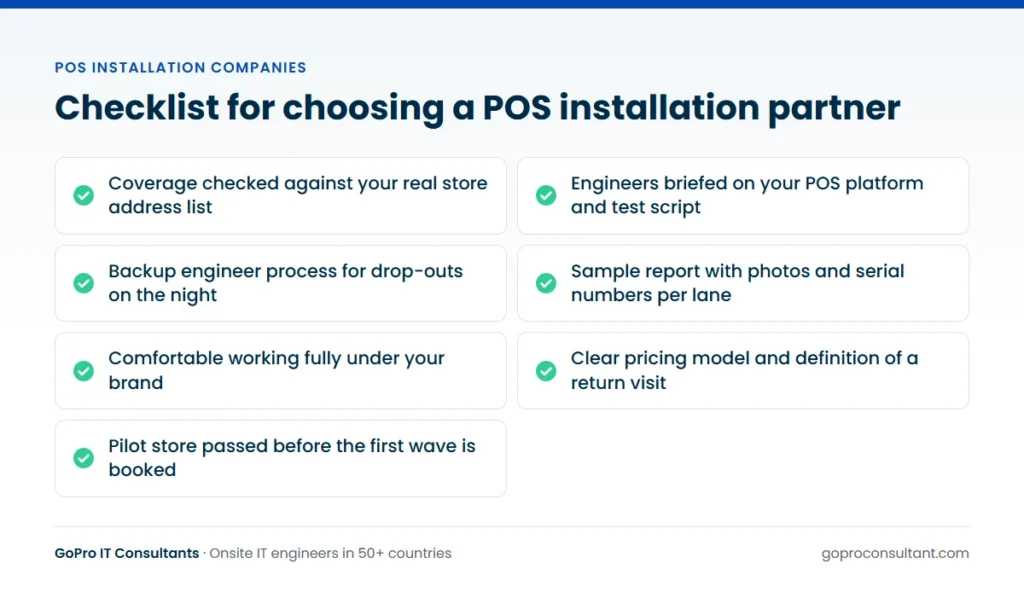
Coverage that matches your store list
Start with geography, because it rules partners in or out fastest. Don’t ask “do you cover France?” Send the actual address list and ask which stores they can reach with their own engineers, which go to a subcontractor, and which they can’t cover at all. Retail parks and small towns are where coverage claims tend to thin out.
Then ask about scheduling. Can they book several stores on the same night in one region? Can they put two engineers into a large store? What happens if the assigned engineer drops out the day before? A good answer names a backup process and tells you when you’ll hear about the change. We assign a backup and tell the partner straight away, and our global coverage page shows where our engineer network sits.
Real POS experience, not general IT
A competent desktop engineer can usually install a terminal. The difference shows on the night when a receipt printer won’t fire the cash drawer, a scale won’t talk to the terminal, or a card reader pairs but won’t complete a transaction. Ask how the partner briefs engineers for a specific POS platform and peripheral set, and whether they’ll use your build notes and test script.
Ask too how they work with POS vendor support desks. Point of sale installation companies that do this regularly will ask you for the vendor’s out-of-hours contact, the escalation path and a support reference before the first visit. If a bidder doesn’t raise it, raise it yourself.
Questions to ask POS installation companies
Put the same questions to every bidder and compare the answers side by side. This table shows what a useful answer looks like.
| Question | What a useful answer includes |
|---|---|
| How are engineers screened? | Skills, identity, right to work and references, plus a brief before each job |
| What do we get after each visit? | A report with photos, serial numbers, work done and anything outstanding, with a clear deadline |
| What happens if a lane can’t be finished? | Findings and parts needed recorded, with the return visit logged as a new ticket |
| Can you work under our brand? | Your badge, your report template, no commercial talk with the end client |
| How is the work priced? | A clear model (per store, per ticket or day rate) and what counts as extra |
| What insurance and certification do you hold? | Named cover such as public liability and professional indemnity, and any security certification |
For the pricing question in more depth, our post on what drives POS system installation cost lists the scope items every bidder should be quoting against.
Reporting and tracking across the rollout
On a programme of any size, the report is the product as far as your own client is concerned. Ask for a sample site visit report from a comparable job (anonymised) and look at it critically. Can you tell which lane got which serial number? Are there photos of the cabinet as well as the counter? Is anything outstanding written down clearly enough that another engineer could pick it up?
Beyond individual stores, ask how they track the programme. A daily tracker with each store’s status, photos and serial numbers lets you spot a pattern after two stores rather than twenty. That’s how our multi-site rollout service runs, from a pilot site through to the waves.
White-label working and conduct in store
If you’re delivering the rollout to your own client, the engineer represents you. Check the partner is comfortable working fully under your brand: your badge or lanyard, your report template, your escalation contacts. Store managers will ask engineers about delays, other stores and costs. The engineer should pass anything commercial back to you and stick to the work.
Ask about the brief the engineer receives. It should cover site access, store contact, lane plan, test script, vendor support details and what to do with old kit. Our white-label IT services are set up on those terms.
Old kit, data and disposal
Retired terminals and back-office PCs hold transaction logs, user accounts and network settings. Ask each bidder what they do with old kit as it comes off the counter: who logs the serial numbers, whether they can route it to a certified recycler, and what record you get back. If your client needs a documented chain from store to disposal, make that a scored requirement rather than an afterthought.
Check the practical side too. Who packs the old kit, where does it wait for collection, and does the store have room for a stack of boxes until the courier arrives? A partner who asks these questions at bid stage is one who has done this before. One who doesn’t will leave the problem with the store manager.
Test with a pilot before you commit
No questionnaire beats watching a partner do one store. Pick a typical site, give them the full brief and judge the result on these points:
- Did the engineer confirm the visit and the kit before travelling?
- Did they arrive in the window and work lane by lane without stopping trade?
- Did every lane pass the test script with the vendor’s desk?
- Was the old kit logged, labelled and handled as agreed?
- Did the report arrive on time, with photos and serial numbers you could use?
- Were problems flagged to you promptly, rather than discovered in the report?
Use the pilot to tune the brief as much as to judge the partner. If you want a model for the on-the-night tasks, our EPOS installation checklist for store rollouts gives a lane-by-lane version you can adapt.
Red flags worth walking away from
- Promises that every store will be finished in one visit, whatever the store’s readiness.
- No sample report, or a report with no serial numbers.
- Vague answers on subcontracting and who the engineer actually works for.
- A price with no stated scope, so you can’t tell what’s missing.
- No plan for engineer drop-outs on the night.
One more: a bidder who won’t do a pilot without a volume commitment is asking you to take the risk they should be taking.
How to run the selection, step by step
Buying installation capacity goes better as a short, structured process than as a round of sales calls. This is a sequence that works for most programmes, with the decision you’re making at each stage.
- Write the scope first. Store list, lanes and kit per store, install windows, test script, old kit route and reporting needs. Decide now what you’ll be comparing bidders on, or you’ll end up comparing presentation.
- Send a short request for information. Coverage against your address list, POS platforms worked on, sample report, insurance and certification. Drop anyone who can’t answer the coverage question store by store.
- Shortlist and ask for priced proposals. Give the shortlist the full scope and ask each to state its pricing model, its assumptions and its definition of a return visit.
- Interview the people who’ll run it. Talk to the coordinator who’ll handle your nights, not just the account manager. Ask them to walk you through what happens when an engineer drops out at short notice.
- Pilot with your preferred bidder. One typical store, the real brief, judged against the pilot criteria above. If it goes badly, the second-placed bidder gets a pilot too.
- Contract on what the pilot taught you. Update the brief, fix the readiness definition and the return-visit terms, then book wave one.
- Review after the first wave. Look at reports, open items and drop-outs before you release the next batch of stores.
The IT rollout checklist covers the programme planning that should sit alongside this, whoever you choose.
Getting more out of a reference call
Every bidder will offer a reference, and every reference will be a happy one. The call is still worth making if you ask about specifics rather than satisfaction. Ask what size and type of rollout it was, and whether it ran at night. Ask how many stores needed a return visit and why, and how quickly the partner told them when something went wrong. Ask whether reports ever arrived late, and what happened when an engineer dropped out.
Then ask the question that tells you most: would they use the same partner for a programme in a new region, or only where it’s already proven? A reference that hesitates there is telling you where the partner’s coverage really ends. If the work was white-label, the referee may not be able to name their own client, and that’s fine. You’re checking how the partner behaves, not who it worked for.
Scoring the bids side by side
A simple scoring sheet stops the cheapest or most polished bid winning by default. Weight each criterion by how much it would hurt your programme if it went wrong, then score every bidder against the same evidence. The weights below are a starting point, not a rule.
| Criterion | How to test it | Typical weight |
|---|---|---|
| Coverage of your stores | Store-by-store answer against your address list | High |
| Report quality | Anonymised sample report, then the pilot report | High |
| Drop-out handling | Described backup process and how you’re told | High |
| POS platform familiarity | Briefing process and questions asked about your test script | Medium |
| White-label conduct | Willingness to use your badge, template and contacts | Medium, high if your client is watching |
| Pricing clarity | Stated model, assumptions and return-visit terms | Medium |
| Security and insurance | Named cover and certificates you can verify | Pass or fail |
Score price separately, after the rest. A bid that scores poorly on coverage or reporting will cost you more in failed nights than it saves on the rate card.
Managing the partner once the rollout starts
Choosing well is half of it. The other half is how you run the relationship once stores are going live every night.
A short daily check-in
During active waves, a brief call or message each morning covering last night’s stores, open items and tonight’s bookings catches problems while they’re small. It also gives the partner’s coordinator a fixed moment to raise things like a store manager who keeps rescheduling.
Feed the lessons back into the brief
When engineers keep hitting the same issue, say a mount that needs a different screw or a printer setting the image gets wrong, the fix belongs in the brief for every store after it, not in a note on one report. Agree who owns the brief and how changes reach engineers already booked.
Look at patterns, not single nights
One failed lane is noise. The same failure in several stores of one format, or repeated late reports from one region, is a signal. Review the tracker at the end of each wave and talk to the partner about trends before you book the next one.
Keep the end client in the loop through you
On white-label work, your client should hear about progress and problems from you, not from a store manager who chatted to the engineer. A partner that reports promptly makes that possible.
Where GoPro IT Consultants fits
We supply engineers for store installs through our field engineer dispatch service, booked for an agreed date and time including nights and weekends. Engineers are screened for skills, identity, right to work and references, briefed before every job and covered by public liability and professional indemnity insurance. We’re certified to ISO/IEC 27001:2022. Every visit gets a site visit report within 24 hours, in your template if you prefer, and engineers can work fully under your brand.
Our EPOS installation and support service page sets out what we do on site, and POS installation services for multi-site retail describes the work itself. The right partner among the POS installation companies you’re weighing up is the one whose pilot store looks like the other few hundred should.
Frequently asked questions
Should I use one installation partner for the whole estate or several regional ones?
One partner gives you a single report format and one point of contact, which is simpler to manage. Several partners can make sense if no single bidder covers every region well, but you'll need to align briefs and reporting across them.
How many stores should the pilot cover?
One typical store is usually enough to test the brief and the partner. If your estate has very different store formats, consider one pilot per format before the first wave.
Can an installation partner work alongside our own engineers?
Yes. A common split is your engineers covering the regions where you have staff and the partner covering the rest, all working to the same brief and report template.
What should the contract say about failed visits?
It should define when a store counts as ready, who pays for a return visit when it isn't, and how return visits are logged, so there are no surprises mid-rollout.
Try us on one store first
Start with one pilot ticket, no minimum commitment. You get a site visit report within 24 hours with photos and serials.
Book a pilot ticket