

A hardware refresh strategy for a multi-site estate is mostly a sequencing problem. You already know roughly what needs replacing. The hard part is deciding which sites go first, how many go at once, how the kit gets there, who does the work in each country, and how the budget is spread so the programme doesn’t stall halfway through.
This post covers how to plan that: baseline, site grouping, pilot, waves, logistics, field resourcing and budget phasing. For the onsite tasks on each individual site, see our post on the hardware refresh project checklist.
Start with a baseline you can trust
Every decision in the programme depends on the asset data. If the register says a branch has twelve PCs and the engineer finds nineteen, your wave plan, shipping plan and budget are all wrong for that site. Before you plan waves, check the register against reality for at least a sample of sites.
For each site, you want the device count by type, model and serial, support and warranty dates, network and power constraints, site contact and opening hours, and anything unusual: a server under a desk, kit that belongs to a landlord, or a comms room that needs a permit. If the data is thin, a short survey visit to representative sites is cheaper than finding out during the rollout.
Sequencing sites in a hardware refresh strategy
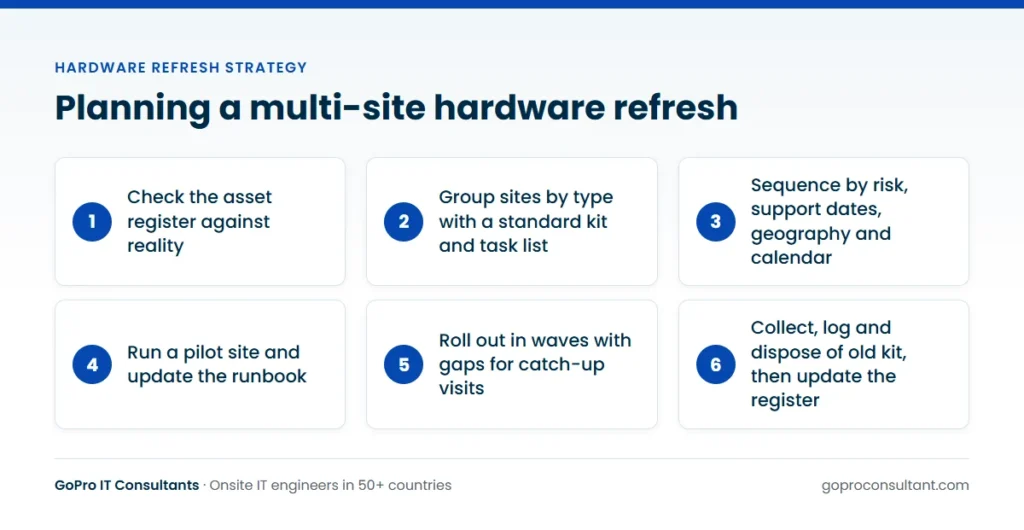
Treating every site as unique makes planning impossible. Group them into a few types, such as head office, regional office, branch, shop or warehouse, with a standard bill of materials and a standard task list for each. Then decide the order. The common drivers are:
- Risk: sites running kit that’s out of vendor support, or failing often
- Support dates: models with the earliest end-of-support date
- Geography: clusters of sites one engineer team can cover in a week
- Business calendar: avoiding trading peaks, year end and local holidays
- Dependencies: a network refresh before an endpoint refresh, or a server move before the branches that rely on it
Geography often wins in practice, because travel time between sites is what eats a field budget. But if a cluster includes a site with a hard deadline, that deadline sets the date for the cluster.
Pilot first, then run in waves
Pick a pilot site that’s representative but forgiving: a normal branch, not the flagship store and not the site with the most awkward users. Run the full process there, from delivery to old-kit collection, and time every step. You’ll find the problems that never show up on paper: a missing adapter in the kit, a user profile that won’t migrate, a delivery bay that closes at noon.
Fix those, update the runbook, then move to waves. Early waves should be small so you can still adjust. Later waves can be larger once the process is stable. Leave gaps between waves for catch-up visits and lessons learned. A programme run back to back with no slack tends to slip, because one failed delivery pushes everything behind it.
Our multi-site rollouts follow this pattern: a pilot site, then waves, with a daily tracker showing photos and serial numbers for every site.
Logistics: staging, kitting and shipping
Decide where devices are imaged and configured. Central staging gives you consistent builds and a single place to fix problems, but adds a shipping leg. Imaging on site cuts shipping but puts more work and more risk on the engineer’s day. Many programmes stage centrally and ship site kits labelled by site and user.
For international estates, allow for customs, import duties, local power plugs and keyboard layouts. Kit for a site in another country may need a local importer of record, and that can take longer than the engineer booking. Plan deliveries to arrive a few working days before the visit, and get someone on site to confirm receipt. An engineer arriving to an empty goods-in bay is the most common avoidable cost in any refresh.
Think about the return leg at the same time. Old devices need packaging, labels and a collection booking, and someone has to decide whether they go back to a central store, straight to a recycler, or stay on site for a short period in case a user needs data recovered. If you leave this until the wave is under way, retired kit piles up in store rooms with nobody sure who owns it.
Field resourcing across many countries
A hardware refresh strategy that works in one country can fail in five if nobody planned the people. For each country or region, decide whether you’ll use your own staff, a local subcontractor, or one field partner across all of them. One partner across countries keeps the process, reporting and briefing the same everywhere, which matters more than it sounds when you’re reconciling hundreds of serials.
Ask how engineers are briefed, how many can be available per wave, and what happens if one can’t attend. We assign a backup and tell you straight away. Check coverage against your site list on our global coverage page, and book out-of-hours visits early for sites that can’t close during the day.
Country-by-country details that change the plan
The process can be the same everywhere. The calendar and the paperwork rarely are. Build these into the wave plan per country rather than discovering them a week before the visit.
Time zones and working days
A programme run from the UK with sites in the Gulf and Australia has very little overlap in the working day. Decide who answers the engineer’s call when a build fails at 8am local time, and whether your service desk can reach a user before they arrive. In the Gulf, the working week and weekend differ from Europe, so a “weekend” visit means different days by country.
Public holidays and trading peaks
Holidays aren’t aligned across Europe, and some countries close down for longer stretches in summer or at year end. Retail clients will usually freeze change around their own peak trading periods too. Put both on one programme calendar so nobody books a wave into a closed week.
Site access and building rules
Shopping centres, shared office buildings and data centres often need contractor registration, inductions or permits booked days in advance. Requirements vary by landlord and by country. Collect them during the baseline, not on the morning of the visit.
Language and documentation
Site contacts and users may not work in English. Decide which language the runbook, the user notices and the site visit reports use, and whether engineers need to speak the local language to do the user-facing part of the swap. A user sign-off is worth little if the user didn’t understand what they were signing.
Roles and responsibilities across the programme
Most stalled programmes have a gap in ownership somewhere: a task everyone assumed someone else was doing. Agree the split in writing before the pilot.
| Party | Typically owns |
|---|---|
| You (MSP or integrator) | Programme plan, wave order, runbook, client reporting, change approvals |
| End client | Budget sign-off, site contacts, user communications, trading freezes |
| Hardware vendor or distributor | Supply, staging if contracted, delivery to site, import paperwork |
| Field partner | Onsite swaps, testing, photos and serials, site visit reports |
| Courier or ITAD provider | Collection of old kit, chain of custody, disposal certificates |
Name a single owner for the asset register. If three parties update it, it’ll be wrong within a week. In a white-label arrangement, also agree how the field partner presents itself on site. Our white-label IT services page explains how engineers work under your brand and use your report template.
A worked scenario: one programme, four countries
Say you’re refreshing laptops and branch switches for a client with offices in the UK, Germany, Italy and Sweden. The switches are close to end of support, so they go first, and the laptops follow once each branch’s network is done. A switch swap needs a change window and someone who can roll back, so those visits are booked for evenings. Laptop swaps happen in office hours, when users are there to sign off. Our post on network switch installation covers the onsite steps for that first phase.
You run the pilot in a UK branch near your own team, so you can attend in person. It shows that the new docks need a firmware update before they’ll work with the laptops, and that user profile sync takes far longer than expected on a slow branch line. Both get fixed in the build before wave one.
Wave one is a handful of UK branches. Wave two adds Germany, where the kit arrives with the right keyboard layouts because the order was split by country at the outset. Italy is moved back a few weeks because the August closures would leave half the sites without a contact. Sweden goes last, grouped so one engineer team covers the cluster of sites in a single trip.
Between waves, you compare the tracker against the plan. Sites that needed a return visit are reviewed for a common cause, and the runbook is updated. By the last wave, the process is routine, which is the point of doing it this way.
Budgeting the programme in general terms
Hardware is the obvious cost. The less obvious ones are what cause overruns. When you build the budget, separate the lines so you can see where money is going:
| Cost line | What drives it |
|---|---|
| Hardware and licences | Device count, model choice, volume terms |
| Staging and imaging | Central or on site, number of builds |
| Shipping and customs | Countries, site count, delivery windows |
| Field engineering | Country, visit length, out-of-hours work |
| Return visits | Missing kit, failed migrations, access issues |
| Old-kit collection and disposal | Volume, data-bearing devices, certificates |
| Project management | Programme length, reporting needs |
Phase the spend to match the waves and your financial year. If you can only fund half the estate this year, refresh the highest-risk half and keep a hardware refresh project for the rest ready to start. Hold a contingency for return visits. Some sites will need one, whatever the plan says.
Why multi-site refresh programmes stall
Programmes rarely fail outright. They slow down, wave by wave, until the end date has moved twice. The usual causes are predictable:
- Supply arrives late or incomplete. One short shipment pushes a whole cluster back. Hold a small buffer stock per country if the budget allows.
- Waves grow too fast. Doubling the site count before the process is stable multiplies every problem the pilot didn’t catch.
- Return visits aren’t scheduled. Failed sites pile up at the end, and the final wave becomes a long tail of mop-up visits.
- The client changes the scope mid-programme. A new model, a new build or extra sites added halfway through resets the learning curve. Treat changes as a new wave, not a quiet edit.
- Nobody reviews the tracker between waves. If the same fault repeats across sites, it’s a process problem, and it’ll keep repeating until someone looks.
- Budget is phased by calendar, not by wave. Funding runs out between financial years while sites are half done. Match spend to the wave plan.
Questions to ask a field partner before the first wave
Ask these before you commit, and get the answers in writing. They’re the ones that decide whether wave five goes as smoothly as wave one.
- Which of our site locations can you cover, and at which response tiers?
- How many engineers can you put on one wave in each country, and how much notice do you need?
- How are engineers screened and briefed, and will the same engineers stay on the programme where possible?
- What happens if an engineer can’t attend on the day?
- What does your daily tracker show, and can it match our format?
- Can engineers work under our brand and use our report template?
- How do you price: per ticket, by day rate, or per site, and what counts as a return visit?
- What insurance and security certifications do you hold?
How GoPro IT Consultants supports a multi-site refresh
We provide the field side of the programme. Our engineer network covers 50+ countries, and rollouts run as a pilot site, then waves, with a daily tracker of photos and serial numbers. Every visit gets a site visit report within 24 hours. Engineers are screened for skills, identity, right to work and references, and briefed before each job, and if one can’t attend we assign a backup and tell you straight away. We’re ISO/IEC 27001:2022 certified. Visits can be scheduled for nights and weekends where sites can’t close, and for long programmes at a large site, resident engineers can cover agreed hours. You can start with one pilot ticket, with no minimum commitment.
Track progress and close each site properly
Agree a daily tracker format before the first wave: site, planned date, status, devices installed with serials, devices collected with serials, photos and open issues. That tracker is what lets you update the asset register, answer the client’s questions and invoice cleanly.
A site isn’t finished when the new kit is working. It’s finished when the old kit has been collected, logged and sent for secure disposal, and the register reflects the change. Plan that leg from day one, using a route such as our IT asset disposition service. For how often each type of device should come round again, see our post on the hardware refresh cycle. The generic onsite tasks are also in our IT rollout checklist.
Frequently asked questions
How many sites should go in the first wave?
Keep early waves small so you can still adjust the process, then increase the size once deliveries, builds and migrations are running smoothly.
Is it better to image devices centrally or on site?
Central staging gives consistent builds and one place to fix problems. On-site imaging cuts shipping but adds work and risk to each visit.
Can one field partner cover sites in several countries?
Yes, and it keeps briefing, reporting and serial tracking the same everywhere. Check the partner's coverage against your site list first.
How do we handle sites that can't close during the day?
Book scheduled visits for nights or weekends early in the plan, since out-of-hours slots tend to be the first to fill.
Refreshing kit across several countries?
Our engineer network covers 50+ countries. Start with one pilot site, no minimum commitment.
Plan a pilot site